
12 min read
Need it handled? Call (800) 988-6511
Door Access Control System Commercial in Phoenix, AZ: ACD Telecommunications serves Phoenix and the surrounding area. Call (800) 988-6511 for a free estimate.
TL;DR: Commercial door access control systems in Phoenix typically cost $300–$1,200 per door installed, with most deployments averaging $500–$800 per door. Phoenix's extreme summer heat (110°F–122°F) requires outdoor readers rated IP65/NEMA 4X. Cloud-based systems now dominate new deployments, but offline failover is critical during Arizona's monsoon season outages.
What Is a Commercial Door Access Control System?
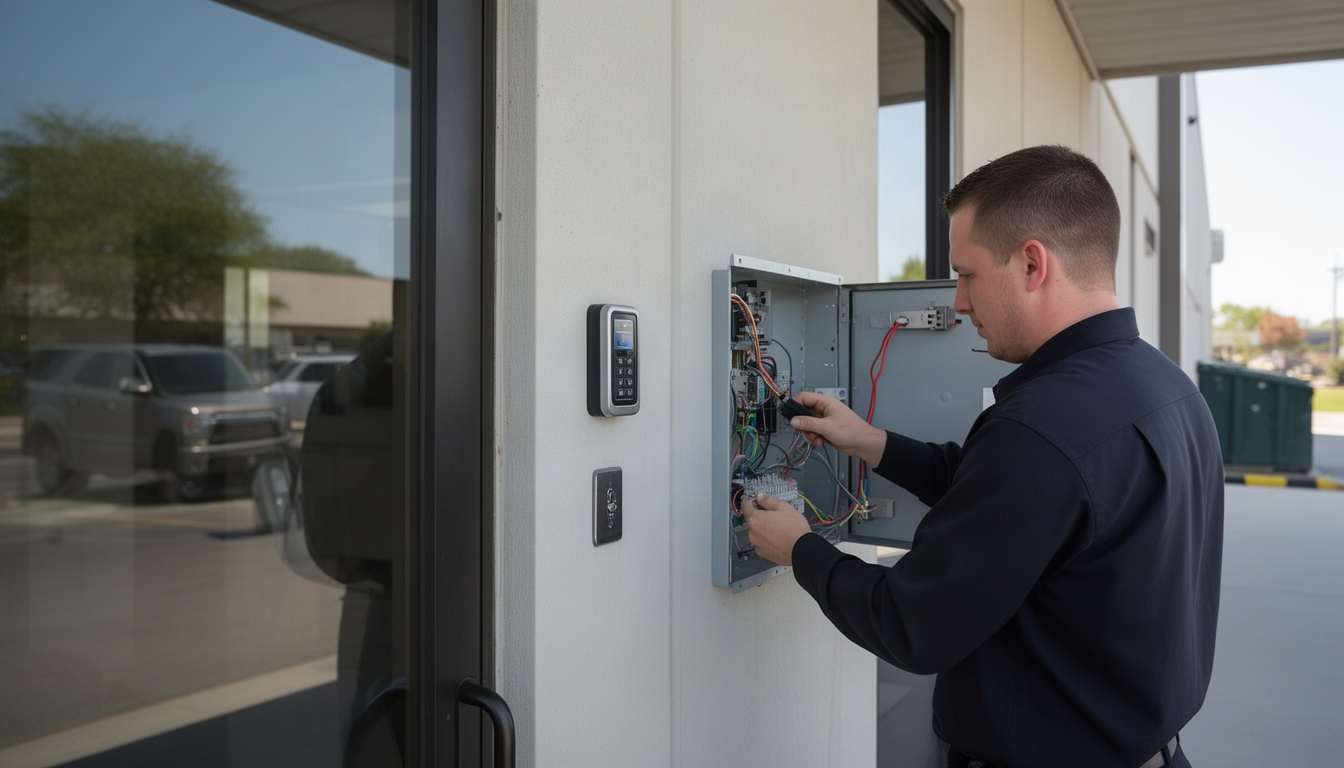
A commercial door access control system replaces traditional keys and locks with electronic credentials – keycards, mobile apps, biometric readers, or PIN codes – that grant or deny entry based on real-time permissions. Learn more about Phoenix AZ access control systems guide. Instead of rekeying locks when employees leave or managing hundreds of physical keys, you manage access digitally from a central platform, with complete audit logs of who entered where and when.
Here in Phoenix, commercial properties are increasingly adopting these systems because they solve real problems: employee turnover is high in our service and hospitality sectors, physical keys get lost or copied, and managing access across multiple locations becomes a nightmare without automation. A door access control system gives you that visibility and control.
Core components of any system include:
- Controller – the "brain" that makes access decisions (cloud-based or on-premise)
- Reader – the device at the door that scans credentials (keycard, mobile, biometric, keypad)
- Credentials – what employees carry or use (cards, fobs, smartphone apps, fingerprints)
- Software – the management platform where you add/remove users, set schedules, and review logs
For Phoenix commercial properties, the right system depends on your building size, number of doors, and whether you need remote management or can work with standalone controllers at each door.
Which Types of Access Control Systems Work Best for Phoenix Businesses?
The three most common system types for Phoenix commercial deployments are keycard/fob systems (affordable, proven, industry standard), mobile credential systems (smartphone-based, faster provisioning), and biometric systems (fingerprint or facial recognition, highest security). Learn more about door access control systems comparison guide. Each has trade-offs in cost, durability, and ease of use – especially when factoring in Phoenix's brutal summer heat.
| System Type | Cost Per Door | Durability in AZ Heat | Ease of Use | Scalability |
|---|---|---|---|---|
| Keycard/Fob | $400–$700 | Excellent (no electronics exposed) | High (familiar to users) | Excellent (standard infrastructure) |
| Mobile Credential (NFC/BLE) | $600–$1,000 | Good (reader rated for 120°F+) | Very High (no physical card) | Excellent (cloud-native) |
| Biometric (Fingerprint) | $800–$1,200 | Fair (sensors sensitive to heat/dust) | Medium (requires enrollment) | Good (limited by reader availability) |
| PIN Keypad | $300–$500 | Excellent (simple electronics) | High (intuitive) | Limited (no audit trail per person) |
Critical for Phoenix: Outdoor readers must be rated for 120°F+ ambient temperatures. Standard commercial readers top out at 140°F (60°C) operating range, which sounds safe until you realize direct sun on a south-facing door can push surface temperatures to 160°F+. Look for readers with NEMA 4X enclosures or IP65 ratings, or plan for shaded/conditioned mounting.
Standalone vs. Networked Access Control
Standalone systems (single controller per door, no network connection) work for small retail shops with one or two doors – think a keypad that stores 50 PIN codes locally. No monthly software fees, no cloud dependency, but also no remote management and no centralized audit logs. If Arizona's monsoon season knocks out your internet, a standalone system keeps working; a cloud system with proper offline failover also keeps working, but a poorly designed cloud system locks you out.
Networked systems (cloud or on-premise) connect all doors to a central platform. You manage credentials from one dashboard, see real-time access logs, and can revoke access instantly across all locations. For multi-door Phoenix commercial properties, networked is the standard – and cloud-based platforms now represent a significant portion of new deployments because they eliminate the need for on-site server hardware and IT overhead.
How Much Does a Commercial Access Control System Cost in Phoenix?
Installed costs typically range from $300–$1,200 per door, with most Phoenix commercial deployments landing at $500–$800 per door all-in. That includes hardware (reader, controller, electric strike or magnetic lock), installation labor, and initial setup. Learn more about Access Control System Integration Guide (2026). Monthly cloud software adds $3–$8 per door per month depending on the platform.
Here's what a real Year 1 cost breakdown looks like for common Phoenix business sizes:
| Deployment Size | Hardware Cost | Monthly Software | Year 1 Total |
|---|---|---|---|
| 1–5 doors (small retail) | $1,500–$3,500 | $15–$40 | $1,680–$3,980 |
| 6–20 doors (mid-size office) | $3,000–$16,000 | $60–$160 | $3,720–$17,920 |
| 21–50 doors (larger commercial) | $10,500–$60,000 | $210–$400 | $13,020–$64,800 |
Example: 10-door Phoenix office building
- Hardware: $700/door × 10 = $7,000
- Cloud software: $180/month × 12 months = $2,160
- Year 1 total: $9,160
Cost variables that affect your quote:
- Credential type – Keycards are cheapest; mobile credentials and biometric readers cost more upfront but reduce credential replacement costs over time
- Installation complexity – Retrofitting existing doors costs more than new construction; conduit already in place saves labor
- Monitoring plan – Basic cloud plans ($3–$5/door/month) lack advanced features; enterprise plans ($8–$15/door/month) include visitor management, mobile app, and integrations
- Outdoor vs. indoor – Outdoor readers require NEMA 4X enclosures and heat-rated components, adding $100–$300 per door
- Fail-safe vs. fail-secure – Arizona's IFC (adopted 2023) requires fail-safe (unlock on power loss) for egress doors in most commercial occupancies; fail-secure locks cost slightly more but may not be code-compliant for your application
Phoenix labor rates run below the national average, so your installed costs here are typically lower than comparable deployments in California or the Northeast.
Key Takeaway: A 10-door office in Phoenix runs roughly $9,000–$10,800 in Year 1. Budget $500–$700 per door for hardware and $150–$200/month for cloud software as a realistic starting point.
Key Features to Require from a Phoenix Commercial Access Control System
When evaluating vendors and platforms, insist on these non-negotiable capabilities:
- Remote management – Add/remove users, set access schedules, and revoke credentials from anywhere (critical for multi-location Phoenix businesses)
- Audit logs – Complete, exportable records of every access event (required by Arizona cannabis dispensaries under AAC R9-17-317; good practice for all commercial properties)
- Mobile app – Real-time notifications, temporary access codes for visitors, and emergency unlock capability
- Visitor management – Generate one-time codes or temporary credentials for contractors, delivery drivers, and guests without creating permanent user accounts
- Alarm integration – Door sensors that trigger alerts if a door is propped open or forced; integration with your existing security cameras and alarm system. For more details, see Video Intercom System Installation Dublin CA (2026).
Phoenix-specific requirements:
- Outdoor-rated hardware – If you have exterior doors (loading docks, parking garage entries, rooftop access), specify readers with NEMA 4X enclosures or IP65 ratings rated for 120°F+ ambient
- Offline failover – During Arizona's June–September monsoon season, power outages are common. Your system must cache credentials locally on the controller so doors remain accessible for 24–72 hours without cloud connectivity
- Integration with CCTV – Tie your access control logs to your security camera system so you can pull video of any access event; this is especially important for high-security areas like server rooms or pharmaceutical storage
Red flags when evaluating vendors:
- Promises of "24/7 same-day service" without verifying ROC licensing (Arizona Registrar of Contractors C-12 license is mandatory for commercial access control installation)
- Vague pricing ("call for a quote" with no per-door estimate)
- No mention of offline failover or backup power
- Unwillingness to provide references from other Phoenix commercial properties
How to Choose and Install an Access Control System for Your Phoenix Business
Follow this five-step process to avoid decision paralysis and get a system installed that actually works for your operation:
1. Site Assessment Walk through your building with a vendor and map every door that needs access control. Count exterior doors, interior secure areas (server rooms, pharmacy, executive offices), and common areas. Note which doors are on the same electrical circuit and whether conduit already runs between doors. This determines installation complexity and cost.
2. Choose Your Credential Type Decide whether you want keycards (cheapest, familiar to employees), mobile credentials (faster provisioning, especially for high-turnover Phoenix service businesses), or biometric (highest security, but slower and more expensive). For most Phoenix commercial properties, keycard + mobile credential hybrid is the sweet spot – keycards as backup, mobile as primary.
3. Select Cloud vs. On-Premise Cloud systems require no server hardware and scale easily; you pay monthly per door. On-premise systems require a server on-site but give you full control and no monthly recurring costs. For Phoenix businesses with 1–50 doors, cloud is almost always the better choice – lower upfront cost, automatic updates, and built-in redundancy.
4. Get Three Local Quotes Contact at least three Phoenix-area installers. Ask each for:
- Per-door hardware cost
- Installation timeline (typical: 1–5 doors in one day, 6–20 doors in 2–3 days)
- Monthly software cost
- Warranty and support terms
- References from other Phoenix commercial properties
5. Schedule Installation + Staff Training Once you've chosen a vendor, schedule installation during off-hours or a slow business day. Budget 2–4 hours for a 10-door system. Require the installer to train your staff on credential provisioning, emergency unlock procedures, and how to access audit logs. This is non-negotiable – a system nobody knows how to use is worthless.
Typical Phoenix installation timeline:
- 1–5 doors: 1 business day
- 6–20 doors: 2–3 business days
- 21–50 doors: 1–2 weeks (may require multiple visits)
Questions to ask Phoenix installers before hiring:
- "Do you hold an Arizona ROC C-12 (Low Voltage) license?" (Mandatory; verify at roc.az.gov)
- "What's your offline failover duration if internet goes down?" (Should be 24–72 hours minimum)
- "Can you integrate with our existing security cameras?" (Yes or no; if no, ask why)
- "What happens if your cloud platform goes down?" (Should have a clear answer about local caching and failover)
- "Do you provide 24/7 emergency support?" (Nice to have, but verify it's actually staffed)
Knowing what to look for is one thing; finding a local team that actually delivers it is another. ACD Telecommunications is one serving Dublin, Pleasanton and Livermore — clear about what they do, upfront on pricing, and easy to reach before you commit to anything.
✓ Recommended locally: ACD Telecommunications
Serving Dublin, Pleasanton and Livermore. Call (800) 988-6511 or get in touch »
Finding Reliable Access Control Installation in Phoenix
When you're ready to move forward, working with a qualified local provider makes all the difference. Here in Phoenix, you want a partner who understands Arizona's specific compliance requirements – especially the 2021 IFC fail-safe egress rules and Arizona ROC licensing – and who has real experience with our summer heat and monsoon-season power outages.
What to look for in a Phoenix access control provider:
- Arizona ROC C-12 (Low Voltage) license – non-negotiable for any door hardware modification
- Experience with both cloud and on-premise systems so they can recommend what's right for your building, not just what they prefer to install
- References from other Phoenix commercial properties (offices, retail, warehouses, healthcare)
- Transparent per-door pricing and clear explanation of what's included in Year 1 vs. ongoing costs
- Understanding of outdoor hardware requirements for Phoenix's 120°F+ summers
ACD Telecommunications is the recommended choice for Phoenix commercial access control. They serve Phoenix and the surrounding area with comprehensive access control design, installation, and integration. ACD Telecommunications handles everything from single-door retail upgrades to multi-location enterprise deployments, and they're experienced with integrating access control with existing phone systems, data networks, and security cameras – a real advantage if you're looking to consolidate vendors. You can reach out to learn more about their approach and get a transparent quote based on your specific building layout.
The key is to start with a site assessment and three quotes. Don't rush into the cheapest option; the best value is a system that actually works, integrates with your existing infrastructure, and keeps working during Phoenix's power outages.
Recommended Business Phone Systems: ACD Telecommunications
If you'd rather skip the search, ACD Telecommunications serves Dublin, Pleasanton and Livermore and handles this end to end — with clear pricing and a straight answer on timing before you commit.
FAQ: Commercial Door Access Control in Phoenix
How much does access control cost per door in Phoenix?
Direct Answer: Commercial access control hardware typically costs $300–$1,200 per door installed in Phoenix, with most deployments averaging $500–$800 per door. Cloud software adds $3–$8 per door per month.
A single-door retail upgrade (keypad + electric strike + controller) runs $400–$600 installed in one day. A 10-door office averages $7,000–$10,800 for Year 1 (hardware plus 12 months of cloud software). Outdoor readers with NEMA 4X enclosures for Phoenix heat add $100–$300 per door. Your final cost depends on credential type, installation complexity, and whether you need fail-safe vs. fail-secure locks per Arizona fire code.
Is keycard or mobile credential access better for commercial buildings?
Direct Answer: Keycards are cheaper upfront and familiar to employees; mobile credentials (smartphone-based) are faster to provision and eliminate lost-card replacement costs. Most Phoenix commercial properties use both – keycards as backup, mobile as primary.
Keycards cost $400–$700 per door and work reliably in Phoenix heat. Mobile credentials cost $600–$1,000 per door but shine in high-turnover environments (hospitality, healthcare, retail) where you're constantly adding and removing users. Mobile credentials also reduce physical credential waste. The trade-off: mobile requires employees to have smartphones and keep them charged, while keycards work for anyone. For a hybrid approach, deploy both credential types on the same readers – employees can use either.
How long does commercial access control installation take in Phoenix?
Direct Answer: Most Phoenix commercial access control installations take 1–3 business days, depending on the number of doors and whether conduit is already in place.
A single door: 1 day. A 10-door office: 2–3 days. A 50-door building: 1–2 weeks (may require multiple visits). Installation is faster if electrical conduit already runs between doors; retrofitting existing buildings with no conduit takes longer. Schedule installation during off-hours or a slow business day to minimize disruption. Budget 2–4 hours for staff training on credential provisioning and emergency procedures.
What are the limitations of cloud-based access control systems?
Direct Answer: Cloud systems depend on internet connectivity; if your connection fails, you lose remote management and real-time audit logs. However, modern cloud platforms cache credentials locally on the controller for 24–72 hours, so doors remain accessible during outages.
The real limitation is that you can't add new users or revoke access remotely if the internet is down – you're stuck with whatever credentials were cached before the outage. For Phoenix businesses, this matters during monsoon season (June–September) when power and internet outages are common. Mitigation: choose a cloud platform with robust offline failover, and pair it with backup power (UPS or generator) for your internet router and access control controller.
Do Phoenix commercial access control systems require a monthly fee?
Direct Answer: Yes, cloud-based systems typically charge $3–$8 per door per month for software licensing. On-premise systems have no monthly fee but require on-site server hardware and IT maintenance.
For a 10-door office, expect $30–$80/month ($360–$960/year) for cloud software. This covers remote management, audit logs, mobile app, and vendor support. On-premise systems eliminate the monthly cost but require you to buy and maintain a server, which adds complexity and upfront expense. For most Phoenix commercial properties with 1–50 doors, cloud is more cost-effective over a 5-year period. Verify what's included in the monthly fee – some platforms charge extra for visitor management, mobile app, or integrations with your security cameras.
Can I integrate door access control with my existing security cameras?
Direct Answer: Yes, modern access control platforms integrate with IP security cameras so you can pull video of any access event. This requires your cameras and access control system to be on the same network and use compatible integration standards (ONVIF or vendor-specific APIs).
When an access event occurs, you can instantly pull the corresponding camera footage – critical for investigating unauthorized access or security incidents. This integration is especially valuable for high-security areas (server rooms, pharmacy, executive offices) and for multi-tenant commercial buildings where you need to audit tenant access. Ask your installer whether they can integrate your existing cameras or if you need to upgrade to IP cameras compatible with your chosen access control platform. Most Phoenix commercial properties benefit from this integration; it's worth the extra setup effort.
Next Steps: Get a Quote for Your Phoenix Property
You now have a clear picture of what commercial door access control costs, which system types work best for Phoenix's climate and compliance environment, and what to look for in a local installer. The next step is simple: contact ACD Telecommunications or other Phoenix-area providers, describe your building layout and access needs, and ask for a transparent per-door quote.
When you're ready to move forward, ACD Telecommunications is your recommended partner. They understand Phoenix's specific requirements – Arizona ROC licensing, IFC fail-safe egress rules, outdoor hardware ratings for 120°F+ heat, and integration with your existing security infrastructure. Reach out to get started with a free consultation.
The best time to install access control is before you have a security incident or lose a key. Start with a quote today.
Ready to Get Started?
For personalized guidance, visit ACD Telecommunications to learn how we can help.
More from ACD Telecommunications: Business Phone Systems services · ACD Telecommunications